
How to create our bootable CD

Download the appropriate ISO bootable CD image for the operating system you are trying to repair. Save this file to your desktop.
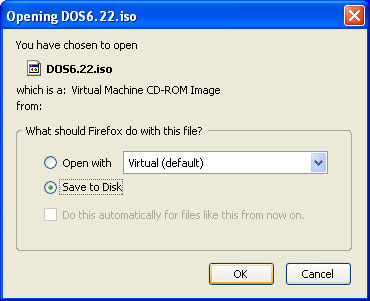
Free download of Microsoft Windows emergency startup boot disk.

Free download of Microsoft Windows emergency startup boot disk.

Open your preferred CD Burning application...I use Nero

In the CD burning application go to the File Menu and select Open
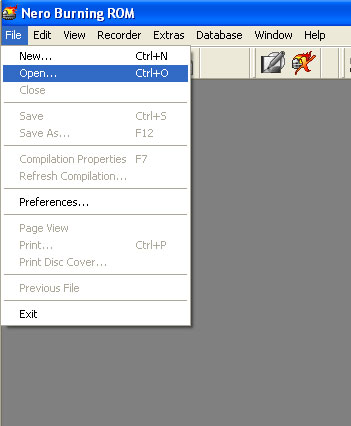
Open free Microsoft Windows ISO image.

Navigate to your Desktop and select the ISO image you downloaded and press Open
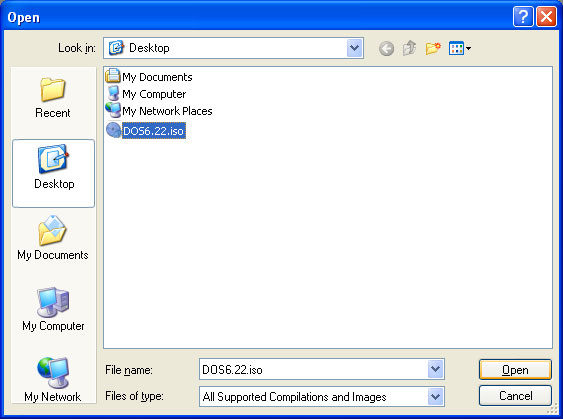
Open free Microsoft Windows ISO image

After pressing Open, in Nero you are immediately presented with the Burn dialogue box. Your application may differ slightly. At this point all you have to do is burn the CD, no further configuration is required.
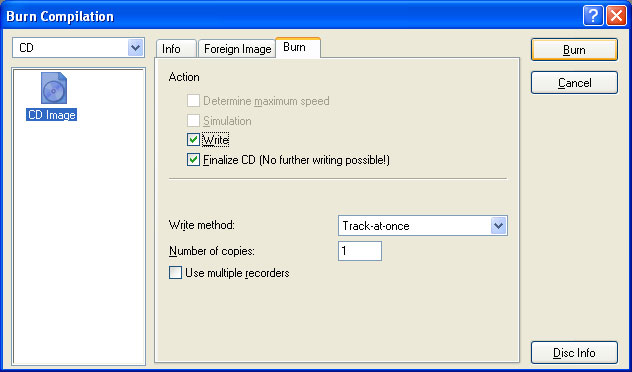
Burn bootable CD image

Your bootable CD is now created.Turn on the computer you want booted and insert the CD into the CD-ROM drive. If the computer does not boot from the CD, restart and check your BIOS settings to ensure that the CD-ROM drive is listed before the hard disk in the boot order. For assistance with this, see the documentation from your computer manufacturer.

Comment viewing options

Select your preferred way to display the comments and click "Save settings" to activate your changes.

Re: How to create our bootable CD

1) What version of Nero is that? I have v5 and I can't not finalize an ISO.

2) I want to burn an ISO of DOS 6.22 or 98/ME and then run an exe off of the CD that boots because I have no floppy and I can't access any drives other than what I boot with to flash BIOS. How can an ISO be burnt that will also run exe files burnt in addition to the ISO on the CD?

3) Is there a way to get to and run files off of other drives after booting from a boot CD?

Re: How to create our bootable CD

What if all you have is windows cd burner will it work with that

Re: How to create our bootable CD

http://www.burnaware.com/
free download version that should allow you iso

Re: How to Create Bootable Win98 cd using Data?

I am using Nero as burning software too I want to create a cd which should contain win98 and some drivers software and I want to know how to create it bootable I mean not via floppy I don't have access with floppy just an image to use it with Nero they have a bootable image with them I mean Nero (C:\Program Files\Ahead\nero\DosBootimage.IMA) but it is different, if there is a image to use it with my data and burn it together to create a bootable cd.

Regards

Re: How to create our bootable CD

what is mean by bootable cd n how to create bootable cd

Re: How to create our bootable CD

I've tried and created a disk via the way you showed us above.
It does working for booting into DOS mode when I restarted, but it can't access into harddrive (c: or d:)
Why?

thanks

;)

Re: How to create our bootable CD

Chances are that your normal operating system is Windows XP or better. Most of the time XP and higher formats your hard drive for the NTFS file system. NTFS is not supported in most versions of DOS. You would need to find a dos driver (or TSR) that will allow you to access NTFS drives.

Re: How to create our bootable CD

ok

Congrats and thanks.

Thanks for make this usefull tools. You help me to solve problems with my notebook.

Re: How to create our bootable CD

super

Re: How to create our bootable CD

Hallo!
Thanx for the info you post on the net.However I can't seem to see how to make a bootable cd without using Nero.Any ideas?

Re: How to create our bootable CD

if you don't have nero just go to there wed page and download 30 day test.

Re: How to create our bootable CD

Is this CD for XP Home??

Re: How to create our bootable CD

hey you guy/ladies are the bomb.! i just wanted to know how to create a bootable iso of my harddrive to use in virtual box or vmware.? what do you guys/ladies suggest

Re: How to create our bootable CD

:)

Mounting vs. Burnins

is it possible to mount it onto a virtual drive rather than burning it to a disk? mounting has worked for me in almost every other occasion, but i've never messed with OS emulation before

Re: Mounting vs. Burnins

It is possible to mount the iso onto a virtual drive rather than burn the iso to a disk. You did not specify what virtual drive. So, I am going to assume you are running something like Parallels on a Mac and created a virtual drive for Window98.

In Parallels I am using version 4 and beta version 5 so I will describe the process with version 4.
Open Parallels.
Select the Windows98 virtual machine (assume you have already set this up)
Click the configure icon
In the configure menu select Option-boot order. Move the CD ROM drive to the top of the list using the arrow to the right side.
Then in the configure menu select Hardware-CD/DVD ROM. Make sure the boxes are checked for Enabled and Connected. Next are the icons for Real Device and Image File. Select Image File icon. Next for File click the Choose button and navigate to the location of the iso image file you have downloaded. Select it such as Windows98SE_bootdisk.iso. Interface should already be selected and will likely be IDE. Location should already be selected and will likely be IDE 0:1.

Dale Eshelman

Re: How to create our bootable CD

I need a windows 98 boot disk. I have games on a usb stick and i've got windows 95 software in my computer right now. It won't recognise the usb and i was told to upgrade to windows 98 and it would.
please help !!!!!!!!!

Re: How to create our bootable CD

Very useful website! Thank you for the big help!

Re: How to create our bootable CD

I have a laptop which used to have Linux. After using the manufacturer's recovery disks to restore Windows XP, the machine will not boot. It talks about GRUB and Error 17.

Apparently this GRUB is a pest that needs to be killed with fdisk /mbr. But the recovery disk version of DOS does not contain FDISK or FORMAT or CHKDISK. So I made a CD from this site, with DOS 6.22. I set the computer to boot from the CD. This has no effect, still the machine talks GRUB.

So I physically removed the hard disk and booted with the CD. The computer does not boot from it. The computer knows it has a CD drive, but claims that the disk is not bootable.

Any solution?
Åke

Re: How to create bootable cd with more than one image

Hello sir/Mam,
I am Rajesh Kinger from chandigarh. I want to ask you that i have images of Windows XP professional, Windows 2000 Professional and Windows 98se on my hard disk. I just want to know that i how can i make a bootable cd with these three images in a single cd. Is there any software to help. Please tell me the solutions for this.

Re: How to create our bootable CD

I have windows ME 2000 and need a Reboot download

for a CD to make a Bootable Cd, my A drive does not

function so I have to have it Bootable on CD.

Please advise

David Graham

Re: How to create our bootable CD

needing a little help :( thanks :)

Re: How to create our bootable CD for vista -NTFS

How to make NTFS boot disk, for vista. and CD can use for format, partition,pl reply or solution
Any NTFS boot.iso direct available

Re: How to create our bootable CD

Thank you very much for this site.

Re: How to create our bootable CD

I have found two interesting sources and would like to give the benefit of my experience to you.
I am tuning my pc by the best software for free, with the file search engine DornFall
May be you have your own experience and could give some useful sites too. Because this social site help me much.

How to create our bootable USB

I have a ultra portable labtop - and i wandt to create a BOOT-USB for Windows XP - I have the "HP Drive Key Boot Utility" but, i dont have a the apropriate image file...
I have made a DOS 6.22 bootable USB, but it is not possible to switch to C:\ and view the harddrive.
Alle the images you have here, uses multiple floppys, but i would like it alle on one disk (my USB drive).
I still have my Windows XP CD - can i use this?
Hope you can help!!!

Re: How to create our bootable CD

TORRENTS ILLEGAL????? Well unfortunatly for me i got the blue screen of death with WIN2K SP4 and downloaded the torrent for the complete WIN2K then used PowerISO to burn the image then slipped it in the hardrive and it booted perfectly....

Post new comment

The content of this field is kept private and will not be shown publicly.
  • Web page addresses and e-mail addresses turn into links automatically.
  • Allowed HTML tags: <a> <em> <strong> <cite> <code> <ul> <ol> <li> <dl> <dt> <dd> <hr>
  • Lines and paragraphs break automatically.

More information about formatting options